# IMX290 MIPI Cameras

## 1-Hardware Manual

### 1-1 Hardware Description

* [462 Mono Hardware Description](https://www.inno-maker.com/product/cam-mipi462mono/)
* [290 Mono Hardware Description](https://www.inno-maker.com/product/cam-mipi290mono/)
* [290 Color Hardware Description](https://www.inno-maker.com/product/cam-mipi290raw-color/)

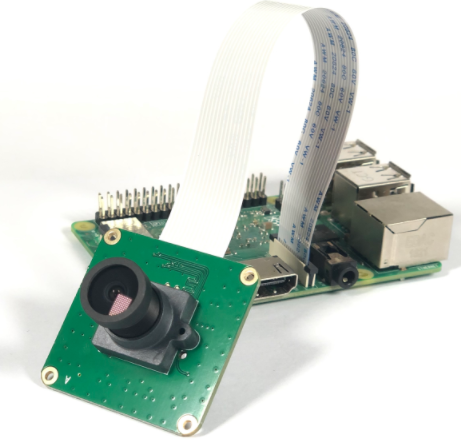
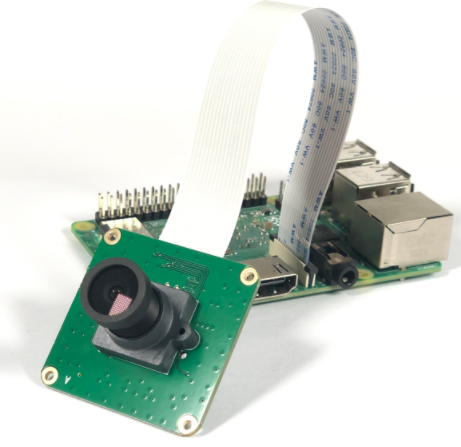
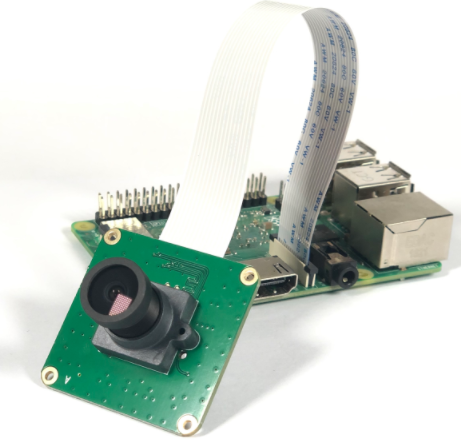
Both Of IMX327,IMX462,IMX296 Camera Module Share The same PCB.(The same PCB silk screen)

<table data-full-width="true"><thead><tr><th>IMX290 Camera Module</th><th>IMX462 Camera Module</th><th>IMX327 Camera Module</th></tr></thead><tbody><tr><td><div><figure><img src="https://509505459-files.gitbook.io/~/files/v0/b/gitbook-x-prod.appspot.com/o/spaces%2F7wRxfA2x73F2dy4vGWH7%2Fuploads%2FqeB94PUyLrlEwyfEgofJ%2Fimage.png?alt=media&#x26;token=3d5227bb-1990-4379-93dd-a4b64a689f8b" alt=""><figcaption></figcaption></figure></div></td><td><div><figure><img src="https://509505459-files.gitbook.io/~/files/v0/b/gitbook-x-prod.appspot.com/o/spaces%2F7wRxfA2x73F2dy4vGWH7%2Fuploads%2Fn7kroCPfltmtA4T73YdQ%2Fimage.png?alt=media&#x26;token=dd0fea8a-265a-4079-8207-07308d3550e3" alt=""><figcaption></figcaption></figure></div></td><td><div><figure><img src="https://509505459-files.gitbook.io/~/files/v0/b/gitbook-x-prod.appspot.com/o/spaces%2F7wRxfA2x73F2dy4vGWH7%2Fuploads%2FqRFWq8qiGH3BRIctp5PS%2Fimage.png?alt=media&#x26;token=aaa8a1ea-c69d-4de4-9b7e-a33175fa67bc" alt=""><figcaption></figcaption></figure></div></td></tr></tbody></table>

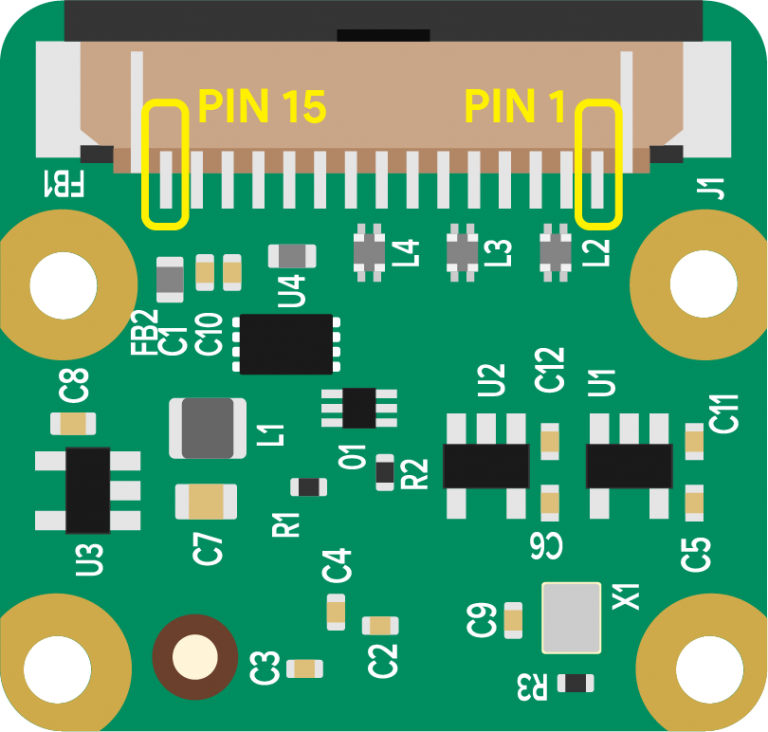
### 1-2 Camera Pins Out

<figure><img src="https://509505459-files.gitbook.io/~/files/v0/b/gitbook-x-prod.appspot.com/o/spaces%2F7wRxfA2x73F2dy4vGWH7%2Fuploads%2FuE54708UmkCBGhNS6dgh%2Fimage.png?alt=media&#x26;token=4880be23-a544-475f-9cbc-aa9017f6517f" alt=""><figcaption></figcaption></figure>

**Raspberry Pi Camera Pinout (15-Pin)**

| Pin # | Name       | Description               |
| ----- | ---------- | ------------------------- |
| 1     | GND        | Ground                    |
| 2     | CAM\_D0\_N | MIPI Data Lane 0 Negative |
| 3     | CAM\_D0\_P | MIPI Data Lane 0 Positive |
| 4     | GND        | Ground                    |
| 5     | CAM\_D1\_N | MIPI Data Lane 1 Negative |
| 6     | CAM\_D1\_P | MIPI Data Lane 1 Positive |
| 7     | GND        | Ground                    |
| 8     | CAM\_CK\_N | MIPI Clock Lane Negative  |
| 9     | CAM\_CK\_P | MIPI Clock Lane Positive  |
| 10    | GND        | Ground                    |
| 11    | CAM\_IO0   | Power Enable              |
| 12    | CAM\_IO1   | LED Indicator             |
| 13    | CAM\_SCL   | I2C SCL                   |
| 14    | CAM\_SDA   | I2C SDA                   |
| 15    | CAM\_3V3   | 3.3V Power Input          |

### 1-3 Camera Lens

Lens Datasheet

{% file src="<https://509505459-files.gitbook.io/~/files/v0/b/gitbook-x-prod.appspot.com/o/spaces%2F7wRxfA2x73F2dy4vGWH7%2Fuploads%2F8239Ybx57wOi1K8XAU36%2FZH3019.pdf?alt=media&token=e6e10050-53b8-4ca5-98c2-bd768e8eede9>" %}

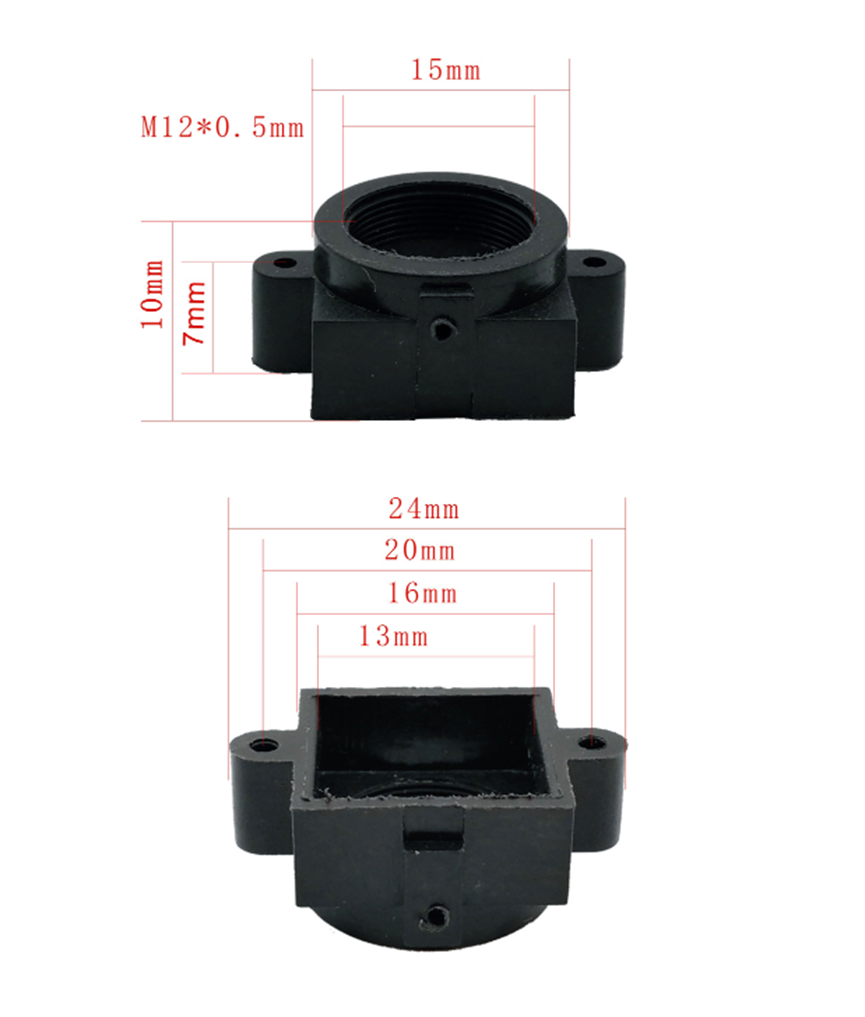
Lens Holder

<figure><img src="https://509505459-files.gitbook.io/~/files/v0/b/gitbook-x-prod.appspot.com/o/spaces%2F7wRxfA2x73F2dy4vGWH7%2Fuploads%2FPMI62r6HlHcu27BV6ggV%2Fimage.png?alt=media&#x26;token=15395241-4186-4e6a-84af-f87e058dcf68" alt=""><figcaption></figcaption></figure>

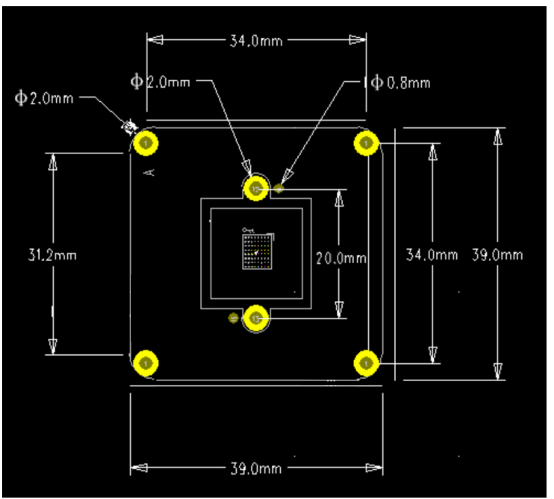
### 1-4 Camera Size

<figure><img src="https://509505459-files.gitbook.io/~/files/v0/b/gitbook-x-prod.appspot.com/o/spaces%2F7wRxfA2x73F2dy4vGWH7%2Fuploads%2FIeHbtu5CyofV0hsfsslR%2F327-290-2D-39-39.png?alt=media&#x26;token=6c7a112e-d73b-45e3-97ca-bcbcd7046f2b" alt=""><figcaption></figcaption></figure>

## 2-Quick Start For Raspberry PI

### Step1,downlod json file for imx290/imx426/imx327 sensor module

* git clone <https://github.com/INNO-MAKER/CAM-IMX462Mono.git>
* cd /home/pi/CAM-IMX462Mono
* sudo chmod -R a+rwx \*

### Step2, Open the config.txt on Raspbian:

* sudo nano /boot/firmware/config.txt

### Step3, Add the following text below the \[all] line in the config.txt file

<figure><img src="https://509505459-files.gitbook.io/~/files/v0/b/gitbook-x-prod.appspot.com/o/spaces%2F7wRxfA2x73F2dy4vGWH7%2Fuploads%2Ffx0xBqaOizyXPrjgK5ww%2Fimage.png?alt=media&#x26;token=c196c697-d541-4ad3-ba53-8b6dae803ada" alt=""><figcaption></figcaption></figure>

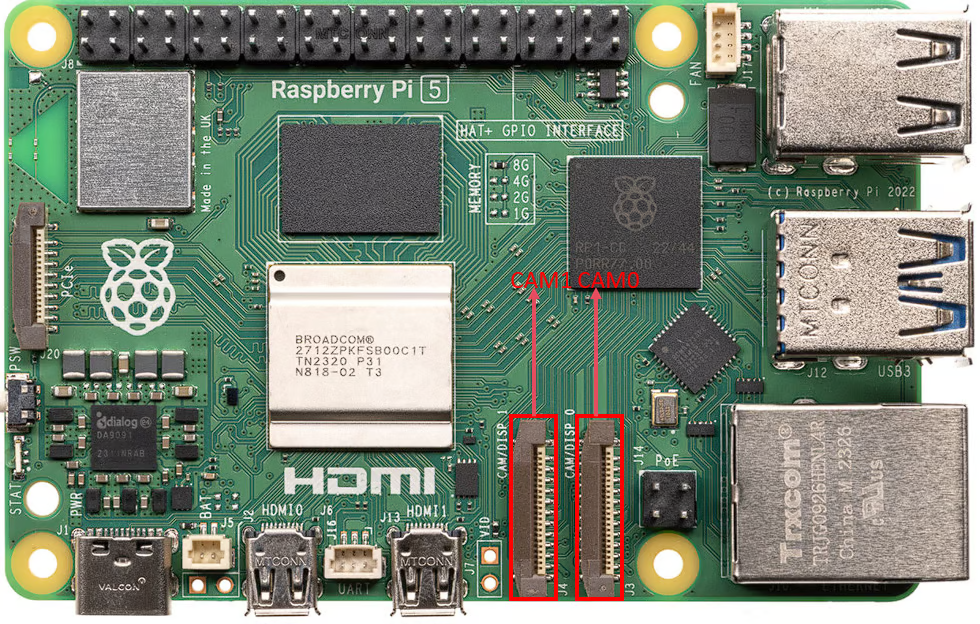
For CAM0

* dtoverlay=imx290,clock-frequency=74250000,cam0

For CAM1

* dtoverlay=imx290,clock-frequency=74250000,cam1

### Step4, change camera\_auto\_detect=1

* camera\_auto\_detect=0

### Step5,reboot and use libcamera for preview

* sudo reboot

### Step7,use libcamera for preview:

* libcamera-still -t 0 --tuning-file /home/pi/CAM-IMX462Mono/innomakerpi5\_imx290.json

## 3-Preset System IMG download

This is for customer no need to setup anything.this img works for imx327,462,290 sensor module color mono version.

{% embed url="<https://www.jianguoyun.com/p/DW2rtusQpdSrBxjBkv0FIAA>" %}

## 4-FAQ

### 1, Not works on PI3 with bullseys os

Reason: On Raspberry Pi 3 and earlier devices running Bullseye you need to Resolve Method: re-enable Glamor in order to make the X-Windows hardware accelerated preview window work.

Open terminal window

* sudo raspi-config

Choose

* Advanced Options
* Glamor
* Yes.

Finally quit raspi-config and let it reboot your Raspberry Pi.

### 2 Not works on Raspberry PI5/CM5 with lastest OS

Reason：lack of json file.

Resolve Method: Download json file from legacy os or from our github.

## 5- IMX327 IMX462 IMX290 Selection Guide:

Below is a comparison table of the Sony IMX290, IMX327, and IMX462 color sensors, combining common characteristics and differences in a single table for clarity.

<table data-header-hidden data-full-width="true"><thead><tr><th></th><th></th><th></th><th></th></tr></thead><tbody><tr><td>Characteristic</td><td>IMX290</td><td>IMX327</td><td>IMX462</td></tr><tr><td>Resolution</td><td>1920x1080 (1080p)</td><td>1920x1080 (1080p)</td><td>1920x1080 (1080p)</td></tr><tr><td>Sensor Size</td><td>1/2.8 inch (diagonal 6.46 mm)</td><td>1/2.8 inch (diagonal 6.46 mm)</td><td>1/2.8 inch (diagonal 6.46 mm)</td></tr><tr><td>Pixel Size</td><td>2.9µm x 2.9µm</td><td>2.9µm x 2.9µm</td><td>2.9µm x 2.9µm</td></tr><tr><td>Technology</td><td>STARVIS Back-Illuminated CMOS</td><td>STARVIS Back-Illuminated CMOS</td><td>STARVIS Back-Illuminated CMOS</td></tr><tr><td>Pin Compatibility</td><td>Pin-compatible</td><td>Pin-compatible</td><td>Pin-compatible</td></tr><tr><td>G Sensitivity (digits)</td><td>5486</td><td>10741</td><td>10741</td></tr><tr><td>Frame Rate (fps)</td><td>Up to 120</td><td>Up to 60</td><td>Up to 120</td></tr><tr><td>Near-Infrared (NIR) Performance</td><td>Good</td><td>Better</td><td>Best</td></tr><tr><td>Cost</td><td>Lowest</td><td>Medium</td><td>Highest</td></tr><tr><td>HDR Support</td><td>BOL-HDR</td><td>Multiple Exposure/Digital HDR</td><td>HCG Mode/HDR</td></tr><tr><td>Other Features</td><td>Mature driver support</td><td>Anti-reflective coating version (IMX327LQR1, sensitivity 2519 mV, SNR1s 0.17 lux)</td><td>High Conversion Gain (HCG) mode, superior noise control</td></tr></tbody></table>

&#x20;

### Explanation

* Common Characteristics (first 5 rows: Resolution, Sensor Size, Pixel Size, Technology, Pin Compatibility): All three sensors share identical resolution, sensor size, pixel size, STARVIS back-illuminated CMOS technology, and pin compatibility, making them interchangeable in hardware designs and suitable for low-light and near-infrared applications.

&#x20;

* Differences (last 5 rows: G Sensitivity, Frame Rate, NIR Performance, Cost, HDR Support, Other Features):
* * G Sensitivity: IMX327 and IMX462 (10741 digits) outperform IMX290 (5486 digits) in low-light conditions.
  * Frame Rate: IMX290 and IMX462 support up to 120 fps, ideal for dynamic scenes; IMX327 is limited to 60 fps, better for static scenes.
  * NIR Performance: IMX462 offers the best NIR sensitivity, followed by IMX327, with IMX290 being the least effective.
  * Cost: IMX290 is the most cost-effective, IMX327 is mid-range, and IMX462 is the most expensive.
  * HDR Support: IMX290 supports BOL-HDR; IMX327 supports multiple exposure/digital HDR; IMX462 includes HCG mode and HDR, with better noise control.
  * Other Features: IMX290 has well-established driver support; IMX327 offers an anti-reflective coating version; IMX462’s HCG mode enhances low-light noise performance.

### Selection Guidance

* IMX290: Best for budget-conscious projects requiring high frame rates but with moderate low-light performance needs (e.g., indoor surveillance).
* IMX327: Suitable for static low-light scenes (e.g., night vision surveillance) with a balanced cost-performance ratio.
* IMX462: Ideal for high-end applications requiring superior low-light and NIR performance (e.g., agriculture, intelligent transportation), but at a higher cost.

If you need more detailed technical specs, application-specific analysis, or hardware integration advice, please provide additional context, and I can tailor the response further!